A Useful AI Model Can Still Carry a Backdoor
A capable AI agent can still expose your business. Its permissions need limits that hold when the model makes a harmf...
10 min read
09.10.2026, By Stephan Schwab

Computer use makes an AI look like a tireless office worker. It can see an application, find controls, click, type, and move information between windows. That is useful for one-off work. On its own, it is a poor foundation for a recurring business process. The mechanism operates a user interface built for people; it does not supply a stable contract for the business operation underneath. The difference appears when Office changes focus, a dialog opens, a retry duplicates work, or a screen looks right while the result is wrong.
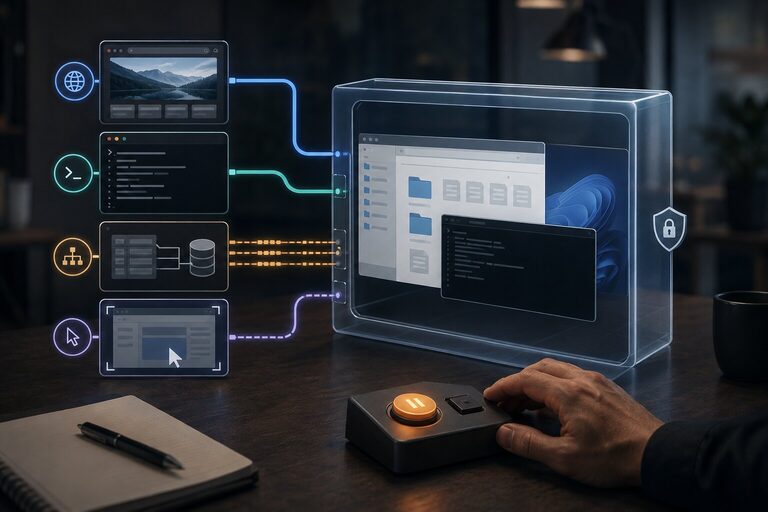
The cursor moves by itself. Excel opens. Numbers appear in cells. Outlook prepares a message. A browser supplies the missing customer data.
It looks like automation without integration.
That is the seductive part.
Products such as ChatGPT Work and Claude Cowork offer computer use to operate graphical applications. The model receives an observation, chooses an action, and returns a tool call. Supporting software executes the click, keystroke, or scroll and supplies the next observation. The model does not reach into the operating system by itself.
This is an impressive way to complete a task once.
It does not, by itself, make a business process reliable every Monday at 08:00.
On macOS, ChatGPT Computer Use requires Screen Recording permission to see an application and Accessibility permission to click, type, and navigate. Accessibility interfaces can expose controls and their properties to assistive software and automation tools. VoiceOver is the familiar example of software using accessibility information.
That is one route, not the definition of computer use. Anthropic’s computer-use tool supports screenshots and mouse and keyboard actions. An agent can identify a button from pixels and click its coordinates without reading an accessibility tree. Implementations may combine visual observations with structured information about controls.
Windows has a related mechanism. Microsoft UI Automation is an accessibility framework that also supports automated UI tests. That qualification matters. UI automation is not inherently absurd. Teams have used it for years.
But a screen reader, a UI test, and an autonomous business workflow are three different things.
A screen reader has a person deciding what the interface means. A well-designed UI test has controlled test data and explicit assertions. An open-ended AI task asks the agent to infer the steps, adapt to whatever appears, manipulate live business data, and judge the result.
You can constrain an agent’s task and give it independent checks. That is precisely the work the moving cursor does not remove.
The same door is being asked to carry a very different load.
The accessibility layer may expose a button called Refresh, a text field with a value, or a table containing rows. It does not explain that Refresh starts a financially significant reconciliation, that the table is showing cached data, or that changing the field after month-end requires approval.
It exposes user-interface semantics.
The business semantics remain somewhere else.
Consider a monthly reporting task:
A person performs those steps and quietly manages dozens of assumptions. Which workbook is active? Which sheet? Which cell has focus? Is the file read-only? Are formulas recalculating automatically? Did the import preserve number formats? Has OneDrive finished syncing? Did an add-in open a dialog behind the main window? Did somebody else edit the workbook? Is the figure on screen a formula result, stale cached content, or text that merely looks like a number?
Computer use inherits every one of those ambiguities.
The accessibility tree can be accurate and the workflow can still be wrong. The agent may successfully activate the control it intended to activate. It may type the expected number into the selected cell. It may receive no error.
None of that proves it selected the right workbook, changed the right business period, preserved the formulas, or saved the version other people will open.
The happy demonstration shows visible motion. Reliability depends on invisible state.
A business operation needs a contract.
It needs named inputs, validation rules, authorization, defined side effects, and a result that another system can verify. If the operation can be retried, it needs protection against performing the same effect twice. If it fails halfway through, it needs a known recovery path.
A graphical application may enforce validation and permissions internally. But access to its controls does not give the agent a documented contract for the whole workflow, safe retries, or recovery across applications.
The computer-use loop works with observations and actions:
The workflow needs stronger statements:
Pixels, focus, and a success dialog do not establish those guarantees. The workflow needs explicit rules and independent checks.
Failure makes the gap obvious. Suppose the agent updates the workbook, times out while saving, retries, sends the email twice, and then stops at a permission prompt. The action loop supplies no transaction across Excel, OneDrive, and Outlook. The world has already changed in pieces.
“Try again” is not recovery.
Sometimes it is duplication with confidence.
Better visual understanding can find more controls. Better reasoning can recover from more dialogs. Faster action loops can make the work less painful to watch.
The structural problem remains.
The application UI changes with versions, window sizes, language settings, add-ins, account permissions, document state, and whatever notification arrived half a second earlier. Custom controls may expose incomplete accessibility information. A control’s label may stay the same while its business effect changes. The model must keep interpreting a moving surface.
That is why a computer-use run can be both astonishing and unsuitable for repetition. Its strength is improvisation. Repeated business workflows need the opposite: fewer interpretations, fewer possible paths, and explicit failure.
Even OpenAI’s own documentation says to prefer a dedicated plugin or MCP server for data access and repeatable operations, and to choose Computer Use when visual inspection or operation is actually required.
That is not a footnote.
It is the architecture decision.
The Model Context Protocol, or MCP, lets an AI application discover and call tools with defined input schemas. OpenAI’s MCP integration can request approval before executing tool calls. The host’s configuration determines which calls require approval.
MCP itself does not create reliability. It is the plug shape.
The custom software behind the plug does the important work.
Instead of showing the model Excel and asking it to complete the monthly report, an MCP server could expose:
prepare_monthly_forecast(period, division, source_snapshot)
Behind that operation, ordinary software can:
The integration must fit the actual workbook and deployment. Microsoft’s Excel REST API supports Office Open XML workbooks stored in OneDrive for Business, SharePoint, or group drives; it does not cover every file Excel can open. An API name is not a compatibility check. Microsoft documents those limits.
Nor does an API call create a transaction across reporting and email. Build the report, verify the stored version, then track notification as a separate step. If a timeout leaves the send outcome unknown, reconcile it before retrying. A second email is not evidence that the first one failed.
The model can propose the operation and its arguments. The service validates and authorizes them. The model no longer decides which workbook tab to click, whether the selected cell looks plausible, or whether a spinner has spun for long enough.
That is a dramatic reduction in responsibility.
| Computer use | Custom software exposed through MCP |
|---|---|
| Targets windows, controls, coordinates, and visible text | Targets a named business operation |
| Depends on focus, layout, timing, and document state | Accepts typed, validated inputs |
| Needs independent checks beyond the next visible state | Can verify explicit postconditions inside the operation |
| May repeat side effects after a retry | Can enforce idempotency |
| Needs recovery rules outside the click loop | Can implement defined failure and recovery behavior |
| Screenshots and action history need business context | Can record business inputs, effects, and outcomes |
| Acts through permitted apps and their signed-in accounts | Can authorize each narrow operation |
A generic MCP tool called control_excel might remove the need to click through Excel. It still does not define the reporting contract. Neither do run_any_command or click_anywhere. The value comes from making the tool smaller than the application and closer to the business intent.
The boundary should say what the organization permits, not merely what the desktop can do. MCP is optional here: a scheduled job or ordinary API client can call the same business operation. Use MCP when an AI application needs access to it.
Computer use still has an honest role.
It is useful for inspecting a visual defect, changing an awkward setting, exploring an unfamiliar application, collecting information from a system with no usable API, or completing low-risk work that would not justify custom software. It can also help prove that an automation idea has value before anyone builds the durable path.
Keep the human close when the task is one-off, the interface is unpredictable, and mistakes are easy to notice and reverse.
Move to a structured tool when the workflow:
This is the same moment when a spreadsheet macro, low-code flow, or heroic manual procedure quietly becomes production software. The company may still call it office automation. The failure will not respect that label.
The popular expectation is understandable. People already know how to use Office, so an AI that can imitate them appears to remove the need for integration work.
It removes the need temporarily.
The first successful run shows that one set of conditions allowed the task to complete through the user interface. It does not prove that the workflow has stable inputs, controlled authority, repeatable effects, verified outcomes, or recovery.
Computer use is a compatibility layer. It reaches systems that were built for human hands. That makes it a powerful fallback and a weak foundation.
For important workflows, put the business rules in a narrow, testable operation. Expose it through MCP when the model needs to request the work. The software must perform and verify it, handle failures, and leave a record someone can reconcile.
The accessibility layer is a door into the application.
It is not a contract with the business.
Computer use is impressive because it can improvise.
Reliable automation begins when the critical path no longer has to.
Tell me what is happening. I listen, ask a few practical questions, and reflect back what I see: where the risk may sit, what may be blocking delivery, and what looks worth checking next. No pitch, no obligation. Confidential and direct.
Talk it through. Practical reflection, no pitch.
Start a ConversationVisibility and hands-on delivery
Navigator gives your leadership clear insight into patterns, blockers, and capacity. Our Embedded Delivery Partner writes production code with your team and gets delivery moving.